

Buying crypto takes about five minutes once your account is verified. Getting the money back to your bank is the slow part, and two facts blindside almost every beginner. Cash you add from a new bank link can sit under a hold for several business days before you are allowed to withdraw it. And the instant you sell a coin for cash, you trigger a taxable event, even if you never move a dollar off the exchange. I have walked this whole trip myself on a live account, in the order you will hit it, so nothing here is guesswork. This page covers the entire round-trip, buy to hold to sell to withdraw to tax, fee by fee.
- Buying is fast; cashing out is not. A buy clears in minutes, a standard bank withdrawal takes a few business days.
- New bank deposits get held for several business days before you can withdraw the proceeds. Plan around it.
- Selling crypto for cash is a taxable event the moment you confirm, whether or not the money reaches your bank.
- A buy costs more than the sticker fee: a trading fee or spread plus a payment-method fee, stacked. Read the order-review total.
- For a first US account I start beginners on Coinbase for the simpler screen; I move them to Kraken when fees start to matter.
- Withdrawals to a wallet are irreversible. Send a small test first, every time.
What do you need before you start?
Three things, and you can line them up in one sitting: a government photo ID, a funding method in your own name, and a clear-eyed choice between cheap-and-slow or fast-and-pricier funding.
You need a government photo ID because every regulated US exchange runs an identity check, called KYC ("know your customer"), before it lets you trade. Plan to upload a driver's license or passport, and often a selfie taken in the app. Approval can land in seconds or take longer if a review flags something, so have the ID in hand before you start. A slow review mid-purchase is how people end up with cash parked and a price moving away from them.
You need a funding method in your own name. That usually means a bank account linked by ACH transfer, or a debit or credit card. The name on the funding source has to match the name on your exchange account, or the deposit gets blocked, and this is the single most common reason a first deposit fails. A joint account where you are not the primary holder, or a card in a partner's name, will trip the same wire.
Then decide how to fund the account, because the method sets both your cost and your speed. A bank (ACH) transfer is usually the cheapest way in but the slowest, and new bank deposits are exactly the ones that get held before withdrawal. A debit or credit card is faster, often instant, but it typically carries a higher fee, and some card issuers treat a crypto buy as a cash advance with its own charge and interest from day one. Cheap and slow, or fast and pricier. Pick based on whether you care more about the cost of this buy or about having tradeable funds today.
If you want a fuller picture of how Coinbase itself works before you commit, what is Coinbase walks through the company, the products, and what the app actually does.
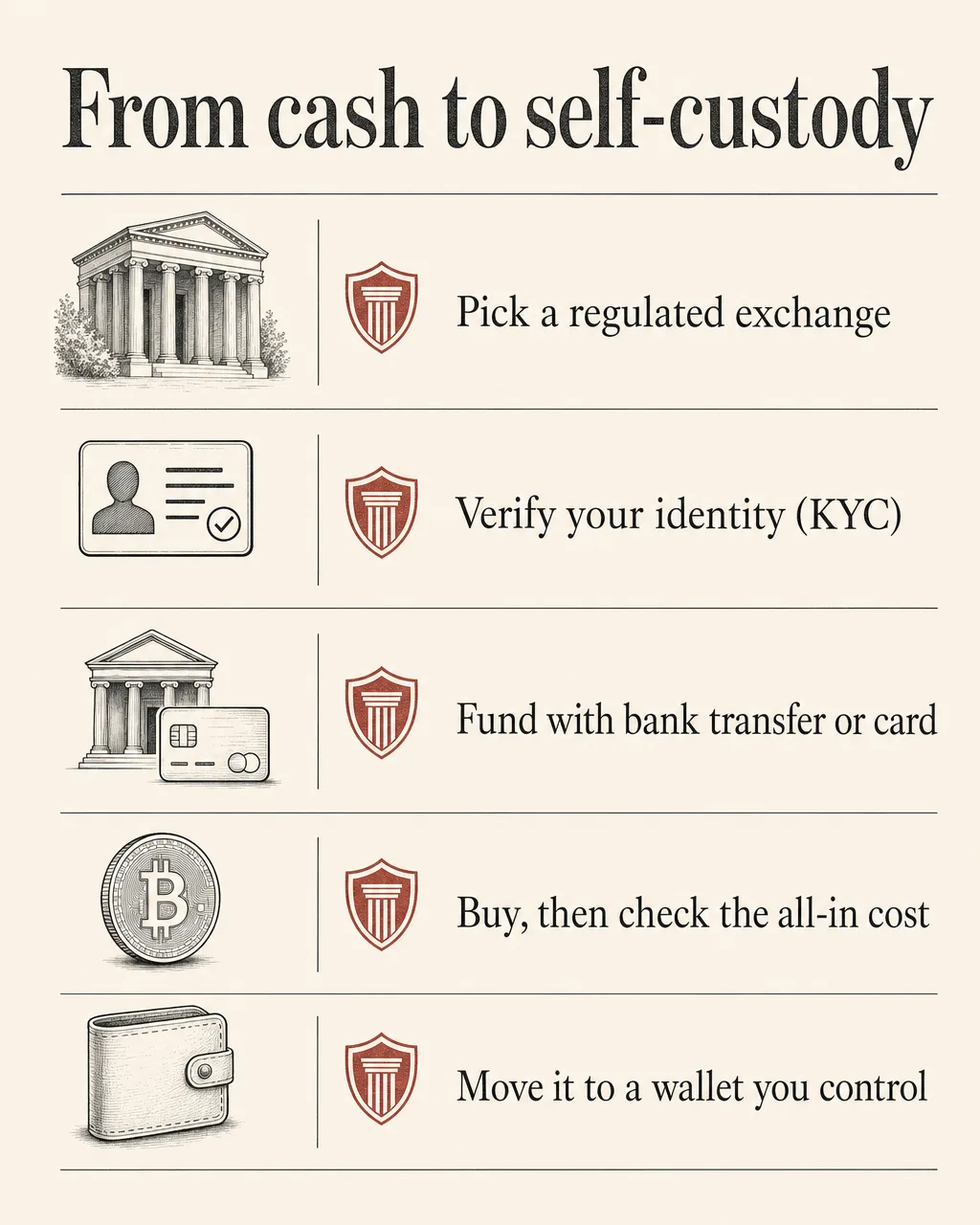
Where can you buy crypto?
For most people in the US, the safest starting point is a regulated, well-known exchange, and for a first account I point beginners at Coinbase. The app is built for someone who has never done this before, the buy screen is hard to get wrong, and it is registered to operate in the US. Kraken is the frequent second choice, and it is usually cheaper on fees for the same trade, with a screen that shows more dials. Cash App lets you buy Bitcoin inside an app many people already have, though it is Bitcoin only and a dead end if you want anything else.
Each platform makes a different trade between simplicity, cost, and how many coins it supports. An exchange built for newcomers tends to charge more per trade for a screen you cannot mess up. A platform aimed at active traders usually costs less but asks you to understand order types first. If fees are your priority, compare the all-in cost of a buy, not the headline trading fee, because the spread (the gap between the buy price and the sell price) is part of what you pay and does not always show up as a line labeled "fee." For a side-by-side on cost, supported assets, and who each one suits, see our Coinbase vs Kraken review.
One rule holds across all of them. Avoid unregulated platforms and anything promising guaranteed returns. If a service is not registered to operate where you live, you have almost no recourse when it freezes withdrawals or disappears, and both happen. A boring, regulated exchange is the right kind of boring. The crypto safety hub covers the warning signs worth knowing before you fund anything.
One more thing to confirm before you sign up: some brokerages and cash apps let you buy crypto but will not let you move it to your own wallet or withdraw it as crypto at all. If you ever want to hold your own coins or send them elsewhere, check that the platform supports crypto withdrawals before you fund it. Policies vary by provider and state, and they change, so read the exchange's current help center rather than trusting a screenshot from last year.
How do you buy crypto on Coinbase, step by step?
The sequence is the same on desktop and mobile; only the button placement differs. Here is the full flow, in order.
- Create your account and verify your identity. Sign up with your email, set a strong, unique password, and turn on two-factor authentication right away, ideally with an authenticator app rather than text messages. Then complete KYC by uploading your photo ID and any selfie the app asks for. Wait for approval before you go further; trying to fund an unverified account just stalls.
- Link your funding method. Connect a bank account by ACH, or add a debit or credit card. Confirm the name on the method matches your account name. If you link a bank, the platform may run a small verification (a micro-deposit or an instant bank login) before the method is usable, so do this before you are in a hurry to buy.
- Add money, or buy directly. Move cash into your account balance first and buy from that balance, or buy in one step that pulls straight from your linked method. Either way works. Just remember that money funded from a bank is what triggers the hold described below, so the funding choice from earlier follows you here.
- Choose your asset. Search for the coin you want by name or ticker and open its buy screen. Stick to assets you actually understand. The search box will cheerfully surface hundreds you have never heard of, and a buy screen looks identical whether the asset is sound or junk.
- Enter the amount and review the order. Type a dollar amount. Before you confirm, the screen shows the fee and the total you will pay. Read it. This is the one moment you see the real cost rather than the advertised one, and it is worth the ten seconds.
- Place the order. Confirm, and the crypto lands in your account, usually within seconds. The buy itself is near instant. What is not instant is your ability to cash that money back out, which brings us to the part most guides skip.
What does a buy actually cost?
More than the sticker fee, because two charges stack. There is the trading fee or spread the exchange takes on the conversion, and there is the payment-method fee tied to how you paid. A card-funded buy almost always costs more than a bank-funded one for the same dollar amount.
Take a $100 buy as the worked example. The exchange takes its cut on the trade, then your payment method adds its own charge on top, so the crypto you actually receive is worth somewhat less than $100, and that gap is the all-in cost. A bank-funded buy keeps the gap smaller; a card-funded buy widens it. The exact percentages move and differ by method, region, and account tier, so I am not going to print a number that will be stale by the time you read it. The order-review screen shows your real fee and final total before you confirm, and that screen is the source of truth. Compare that all-in total across platforms, and check the current figures on each exchange's own fee page.
Why is your money on hold after you buy?
Because the deposit has not fully cleared yet. When you fund with a new bank transfer, the exchange typically locks those funds for several business days before you can withdraw the proceeds back to a bank.
A new bank (ACH) deposit is usually held for several business days before you can withdraw the cash, even after you have sold. You can normally still trade during the hold, but you cannot pull the money out. This is the number-one frustration I see from first-time sellers: they buy, the coin rises, they sell, and then learn the cash is frozen for days because of how it was funded. The hold protects the platform against reversed or fraudulent transfers. If you might need the money back fast, fund in a way that does not trigger a long hold, and verify the current hold rules on your exchange before you rely on the timing.
Knowing the hold exists changes how you plan. If a withdrawal deadline matters to you, work backward from it: the hold clears on its own once the deposit settles, but it does not care about your schedule.
How do you cash out on Coinbase, step by step?
Cashing out is two moves, not one. You sell crypto for cash, then withdraw that cash to your bank. Plenty of beginners do the first step and think they are done, while the money is still sitting on the exchange.
- Sell your crypto for cash. Open the asset, choose sell, and enter the amount. The app converts it to your local-currency balance inside your account. The instant you confirm this sale, you have a taxable event, covered in the next section, so do not skip it.
- Check your available balance. Your cash balance now shows the proceeds. If the money you originally bought with was a recent bank deposit, part or all of that balance may still be under the hold and not yet withdrawable. The number you can sell is not always the number you can withdraw.
- Start a withdrawal to your bank. Choose withdraw, pick your linked bank account, and enter the amount. Confirm the destination details carefully, since a wrong account number is a slow, painful thing to unwind.
- Pick your withdrawal speed. Another fee decision lands here. A standard bank (ACH) withdrawal is usually the cheapest and the slowest. An instant withdrawal is fast but carries a percentage or flat fee. A wire is fast for large amounts and typically the priciest of the three. Choose based on how soon you actually need the cash.
- Confirm and wait for settlement. Once you submit, the cash moves toward your bank. Standard transfers take a few business days; instant options move faster for the fee. The withdrawal is now in motion, and where it lands depends on the speed you picked.
Standard, instant, or wire: which withdrawal speed?
A standard ACH transfer is the default and the cheapest, but it takes a few business days to land. An instant withdrawal puts money in your account quickly and charges a percentage or flat fee for the speed. A wire suits large sums and arrives fast, carrying the highest fee of the three. If you are not in a rush, standard saves you money and the wait is the only cost. If you need the cash today, you pay for that. The exact fees and timings for each option show on the withdrawal screen before you confirm, so check there for current figures rather than trusting a fixed number from anywhere else.
Withdrawing crypto instead of cash
Cashing out to a bank is one exit. The other is moving the crypto itself off the exchange to a wallet you control, which is a different action with a different risk.
A crypto withdrawal to an external wallet address is irreversible. There is no support line that can claw back coins sent to a wrong or mistyped address, and there is no chargeback. Before you send a real amount, confirm you have the right address and, just as important, the right network, because sending on the wrong network is one of the most common ways people lose funds for good. Self-custody puts you in charge of the keys and the mistakes both.
Send a small test transfer first. Before moving any meaningful amount to a wallet, send a tiny amount, wait for it to arrive in the receiving wallet, and confirm it shows up. The test costs you a small network fee and buys you certainty that the address and network are right. I do this every single time, even to addresses I have used before. If you are setting up self-custody, how to set up MetaMask covers the wallet side, and how to move crypto off an exchange walks the send itself.
For the wallet itself, MetaMask is a common first software wallet, and the same test-send rule applies the first time you fund it.
Cash-out troubleshooting
Two problems account for most stuck withdrawals. The first is the deposit hold: if you funded recently from a bank, the proceeds are not free to move yet, and waiting out the hold fixes it. The second is a name or verification mismatch on the bank account; if the linked account does not match your verified identity, the platform can disable payouts until you sort it out. If a withdrawal is greyed out or rejected, check those two before you assume something is broken. A third, smaller one: hitting a daily or tier-based limit, which higher verification usually raises.
What are the tax facts before you cash out?
Selling crypto is a taxable event in the US, and this is the part most pages bury in a footnote. You do not have to send money to your bank to owe tax; the sale itself is what counts. When you sell a coin for more than you paid, the profit is a capital gain, and that gain is taxable in the year you sell. Sell for less than you paid and that is a capital loss, which can offset other gains and soften the bill.
Selling crypto for cash is a taxable event the moment you confirm the sale, whether or not you ever move the money to your bank. Swapping one coin for another counts too. People assume tax only happens when cash hits their checking account, and that assumption builds a surprise into the next filing. Treat the timing of a sale as a tax decision, not an afterthought.
How much you owe turns on how long you held the coin. Sell within a year of buying, and the gain is generally taxed as ordinary income at your marginal rate, the same bracket your wages fall into. Hold longer than a year and it shifts to long-term capital gain rates, generally lower for most taxpayers. That single difference, short-term versus long-term, is why the timing of a sale is a decision worth making on purpose.
Your gain is the sale price minus what you paid, which is your cost basis. Buy for $100, sell for $160, and the $60 is the gain that gets taxed, not the full $160 you received. Keep records of what you paid and when, for every buy, because cost basis is what determines the gain and the figure you will need at tax time. If you bought the same coin across several dates at different prices, those records also decide which lots you are selling.
Reporting is changing too. Exchanges are moving toward new tax forms that report your crypto activity, including cost basis, to both you and the tax authority. The direction is clearly toward more disclosure, not less, so your own records should match what your exchange reports rather than contradict it. Check the current effective dates and form requirements on IRS.gov, since the rollout has specific timing.
One honest caveat: we explain how the tax treatment works, but we are not tax advisors, and your situation may differ. For anything that affects a real tax bill, check the current IRS guidance or talk to a qualified professional before you act.
How do you buy on exchanges other than Coinbase?
The pattern barely changes from one platform to the next: verify your identity, link a funding method, choose your asset, review the all-in cost, confirm. What changes is the fee structure, the coin selection, and a few per-platform quirks worth knowing before you sign up.
On Kraken, the flow mirrors Coinbase closely, and the draw is usually lower cost for the same trade. The screen shows more detail, a plus for people who want to see what they are doing and noise for people who just want the simplest possible buy. If you want a specific coin a beginner-first app does not list, a broader exchange like this is often where you find it. When fees start to matter more than hand-holding, this is the move I point people toward.
To buy a specific token, say XRP, the steps are identical to buying Bitcoin: search the asset by name or ticker, open its buy screen, enter an amount, review the all-in cost, and confirm. The only real differences between coins are which platforms list them and, sometimes, the network details that matter when you withdraw the coin to a wallet rather than cashing out to a bank. Get the network right on that step; it is the same irreversible-send rule from earlier, and the small-test-send rule applies just as hard.
Cash App sits at the simple end of the range. It is built around Bitcoin, so it is a fast on-ramp if Bitcoin is all you want and a dead end if you want anything else. Some app-based brokerages go further and do not let you withdraw crypto to your own wallet at all, only sell back to cash, so match the platform to what you actually plan to do before you sign up, not after.